ePub2Markdown - A fully in browser converter.
Over the weekend, I got to work making something for the PocketMage.
If you haven’t heard of it, Ashtf made a productivity device using an ESP32-S3 and an eInk display.
Check out the YouTube playlist here!
One of the many ideas for the device was to be able to read eBooks directly off of the PM. As ePub rendering is complicated and computationally intensive, it was suggested that Markdown based ebooks were used (Ashtf had made a excellent Markdown renderer).
Unfortunately, there are almost no Markdown file based ebooks. So, I decided to make my own converter for ePub to Markdown.
If you want to check it out, it’s on my GitHub here:
GitHub Repository
Direct Link
How it Works
On the surface, the app feels simple: you drag in an .epub file, wait a moment, and out comes a neat block of Markdown. But under the hood, there’s actually a lot going on, and most of it is just clever use of the ePub format itself.
Step 1: ePubs are just ZIPs
Unfortunately, an .epub file isn’t magic and sorcery. It’s literally just a .zip archive with a different extension. Inside, you’ll find:
HTML or XHTML files: the actual book content, usually one per chapter or section.
Images: covers, illustrations, etc.
CSS stylesheets: formatting rules.
Metadata XML files: describing what’s inside and in what order.
Because of this, the first thing the converter does is feed your .epub into JSZip, which lets JavaScript unzip and read those contents right in the browser. No servers involved!
Step 2: Finding the OPF (the book’s table of contents, sort of)
Every ePub has a META-INF/container.xml file that points to the “real” organizer of the book: the .opf file. Think of the OPF as the table of contents + manifest + metadata all rolled into one.
It lists: 1. The manifest (every file that belongs to the book). 2. The spine (which files to read, and in what order).
Without this, we’d just have a random pile of HTML files and no clue where chapter one actually starts.
Step 3: Walking the Spine
Once the OPF is found and parsed, the script grabs the spine order. This tells the converter:
“This is chapter one (use this HTML).”
“Then load this file as chapter two.”
“Now grab this section as chapter three.”
And so on. That’s how the app ensures the Markdown output matches the book’s actual reading flow.
Step 4: HTML → Markdown
Here’s where the fun part happens! Each HTML chapter is fed through a function that carefully rewrites tags into Markdown syntax. For example:
<h1> → # Heading
<p> → paragraph breaks
<b> / <strong> → bold
<i> / <em> → italic
<a href="…"> → link
<ul>,<li> → - list item
It also cleans up weird ePub quirks like extra whitespace, broken line breaks, or leftover <div> wrappers. The goal is a clean, readable Markdown file, not just raw HTML with a different extension.
Step 5: Progress, Logs, and Feedback
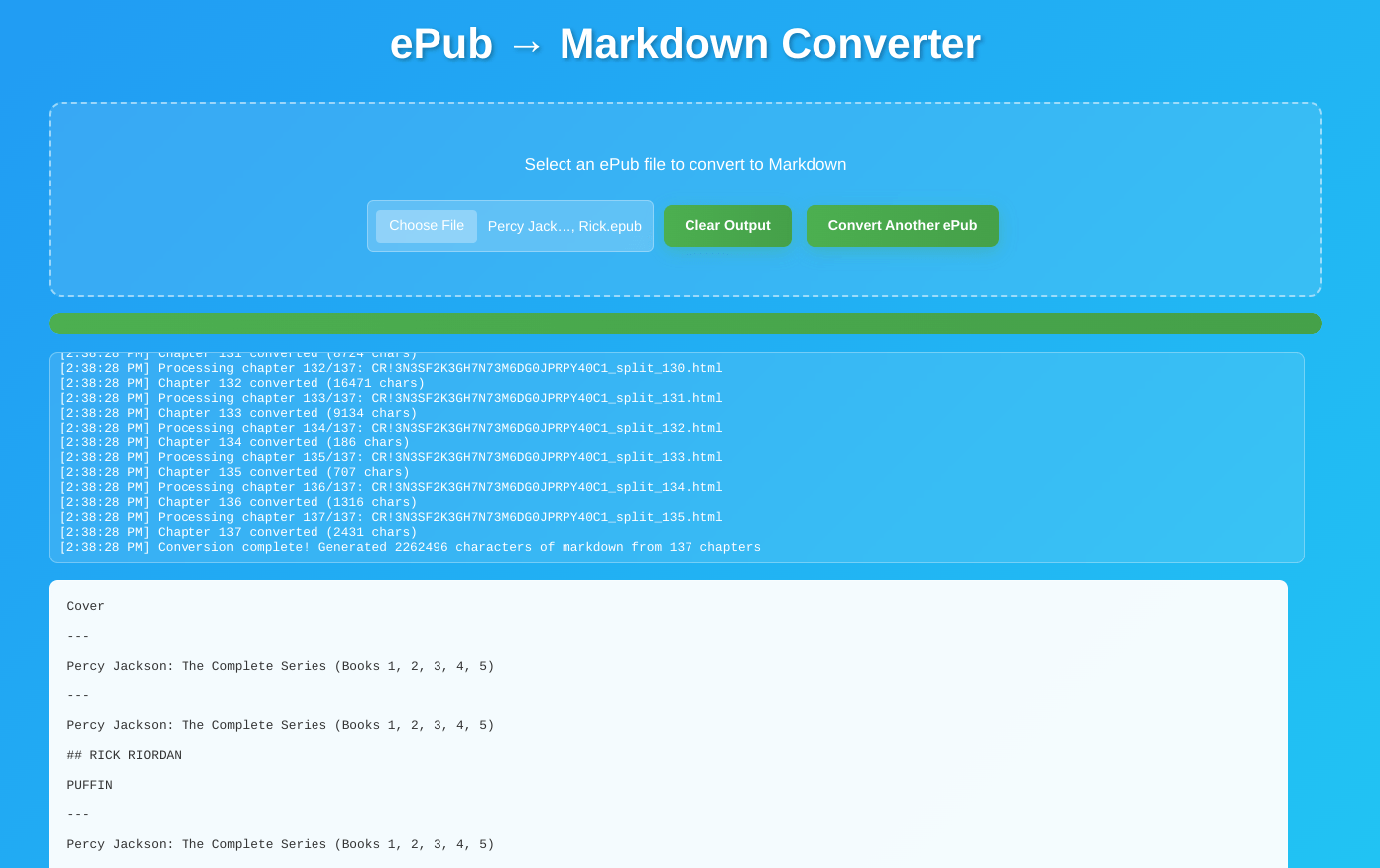
Because some ePubs can be chunky (chunky bois), the app keeps you updated with a progress bar and a running log of what it’s doing. That way you see:
Which chapter is being processed
When something gets skipped (like non-HTML files)
When the conversion finishes
If any error ever happens, open a issue at the GitHub with the tag ePub2Markdown!
Step 6: Stitching It All Together
Finally, once all chapters are converted, they’re joined together with --- dividers (also called Markdown lines ofc).
The complete Markdown text is dropped into a big text area, ready for copy/paste into your editor, blog, or note-taking app.
Why This Approach Works
The reason this tool can live entirely in the browser is because ePubs are already just structured HTML + XML. By leaning on the OPF’s spine, the converter doesn’t need to “guess” the order of chapters. And because everything runs client-side with JSZip, your book never leaves your computer!
It’s private, fast (like seriously impressively fast), and lightweight!
How to Use It
Head over to the online demo
Drag and drop your .epub file into the page.
Wait a moment while the app processes your book.
Copy the Markdown output from the text area, or save it into your favorite editor.
That’s it!
Examples
Here’s a small sample of what the conversion looks like:
- Input (ePub HTML):
<h1>Chapter 1</h1>
<p>It was a bright cold day in April, and the clocks were striking twelve.</p>
<p><a href="note1.xhtml">[1]</a></p>- Output (Markdown):
# Chapter 1

It was a bright cold day in April, and the clocks were striking twelve.

[1](note1.xhtml)Current Limitations
Images: Extracted but not embedded into the Markdown yet.
Footnotes/Endnotes: Preserved as links, but not reformatted.
Tables: Flattened into plain text (Markdown table syntax isn’t supported in all readers).
CSS Styling: Special text effects (like small caps, custom fonts) are ignored.
File Export: Right now you copy/paste — but .md download support is planned.
Roadmap
Some ideas I had for the future:
Option to export a .md file (instead of copy/paste).
Smarter handling of tables and footnotes.
Image embedding or extraction to a folder.
Better error handling for EPUB3 quirks.
Split-per-chapter export.
If you’d like to help, PRs and issues are welcome on the GitHub repo!
Conclusion
This little project makes it possible to take almost any EPUB and turn it into clean, lightweight Markdown, perfect for the PocketMage (:D), note-taking apps, or even blog posts.
Your books stay private, everything runs locally in your browser, and the results are fast!
If you try it out, let me know what you think, and if you run into bugs, please open an issue with the tag ePub2Markdown!